


Bank customer verification

As AI Improves, Anyone Can Sound Like Your Bank.

Fraudsters call your customers as your fraud team, and call your staff as your customers. Both sides need a way to prove who is on the line, under the name your customers already trust.

Trust Onion puts two-way identity verification in an app branded as your bank. Customers verify the bank. The bank verifies the customer.

Book a security review For security teams: how it’s secured
A woman around 40 with dark hair tied back and a canvas apron stands behind the counter of her bakery, holding a phone to her ear.
Voice match: passed Customer
A relationship banker in his 30s in a navy suit and light blue shirt sits at a desk in a bright, modern bank office, phone to his ear.
Banker
INCOMING CALL · ELENA RUIZ “Sam, it’s Elena. My supplier changed banks. Add the new account and send them $48,500 today, please.”
RELATIONSHIP BANKER “Of course, Elena. I’ll set it up now.”

The next call from her might not be her.

The ground shifted

Confirm who is on the line, even when every check passes

An attacker who controls a customer’s inbox and phone number, and has cloned her voice, can pass each check below. The same tools let a stranger sound like your fraud team.

Your fraud team already watches logins, devices and payment patterns. AI adds the voice: a clone built from about 15 seconds of public audio, from a voicemail greeting or a social video, can sound like your customer. A text code goes wherever the number has been moved, and recognizing a voice was never possible across thousands of customers.

  1. The inbox

    A phishing link or a reused password gives the attacker the customer’s email, so email confirmation passes and old statements show who she pays and when.

    • Email confirmation: incorrectly passed
  2. The number

    A SIM swap or carrier port-out moves the customer’s phone number, so caller ID matches and a text code or callback reaches the attacker.

    • Caller ID: incorrectly passed
    • Text code: incorrectly passed
  3. The voice and face

    About 15 seconds of public audio can be enough to clone a voice, and a video call can be faked the same way. See how easy it is.

    • Voice recognition: incorrectly passed
    • Video call: incorrectly passed
  4. The request

    A new payee and an urgent transfer, a raised limit, or a card sent to a new address, from a customer who says she can’t come in.

    • Every check incorrectly passed
It was never her

What are the words?

Each device generates the three words locally. They rotate every 60 seconds, out of reach of anyone holding only the inbox and number.

Demo brand
Merriton Bank
Payment approvals

#5308 · $48,500 · New payee

Elena Ruiz (phone)

Caller verification
Live words
Demo brand
9:41
Merriton
Customer Verification

WITH THE BANK

Rotates every 60 secondsGenerated on this phone

  • BANK · PAYMENT APPROVAL The three words, on the customer’s request.
  • CUSTOMER · ELENA’S PHONE The same three words, on her phone.
  • EVERY 60 SECONDS Both change at the same moment. A caller holding only her inbox and number doesn’t have them.
Elena’s phone and the bank’s payment approval show the same three words, changing together every 60 seconds.

Both directions

When your bank calls, your customers need to know it’s you.

Many bank scams start with a call that claims to be you: a call from “your bank’s fraud team” asking a customer to move money to a “safe account” or read out a code. Attackers also pose as customers to move their money, and as family members to each other. One app in your bank’s name covers every one of those calls.

The same three live words verify the bank calling a customer and a customer calling the bank. Customers and their families also verify each other in their own groups, with words the bank never sees.

When your bank calls a customer

Your customer verifies the bank

The customer asks, “What are the words?” Your staff read all three from the staff view, and the customer checks them in the app before sharing anything.

“Elena, this is Merriton fraud prevention. Your account is at risk. Move your balance to this safe account now.” Elena asks for the words. When the caller can’t give them, she hangs up and calls the number on her card.

When a customer calls your bank

Your staff verify the customer

Your banker asks, “What are the words?” The customer reads all three from their Merriton ID Verify app, and your banker checks them on the request before acting.

When a customer’s family gets a call

Customers and their families verify each other

Customers run their own family group in the same Merriton ID Verify app, with three words the bank never sees. When Elena’s son calls from a new number saying he lost his phone and needs money for rent, she asks, “What are the words?” before she sends anything.

The rule never changes: whoever places the call says the words. Whoever answers checks them.

What’s at stake

Protect the trust your name carries on every call

Every call that uses your bank’s name, real or fake, draws on the trust that name has earned.

A payments operations specialist sits at a desk with two monitors in a bank operations office, phone to her ear, reviewing a payment request.
  • The funds. A forged request moves a customer’s money on your bank’s authority, to an account they never chose.
  • The name. Fraudsters borrow your bank’s name because customers trust it. Each scam in that name teaches customers to doubt your real calls.
  • The relationship. Years of trust with a customer can turn on one call your staff approved, or one call they thought came from you.

The new standard

Verify every request in seconds, and escalate any doubt

Whoever places the call gives three live words, and whoever answers checks them, in one question. For doubtful requests, a signed live selfie adds proof, and your existing controls still run before money moves.

  1. Either side calls. Your customer’s device generates three live words in your bank’s app, and the words rotate every 60 seconds.

  2. Your staff see the same words. They appear on the request in the staff view.

  3. Whoever answers asks. When the customer calls, your banker asks “What are the words?” When your bank calls, the customer asks, and your staff read them from the staff view.

  4. Any doubt, a Proofie™. Your banker requests a live selfie, signed by the customer’s passkey after a Face ID, fingerprint, or passcode check. The signature covers the exact photo plus the time and place, and any edit breaks verification.

Demo brand
9:41
Merriton
Customer Verification

WITH THE BANK

Amber Anchor Willow

New words in 42s

Rotates every 60 secondsGenerated on this phone

Steps 1 to 3
Demo brand
9:41

Proofie™ request

Merriton Bank asked for a Proofie™ to confirm a request.

Take a live selfie. Your passkey signs it after Face ID, fingerprint, or passcode.

Take Proofie™
Step 4: the request
Demo brand

Face ID unlocked the key

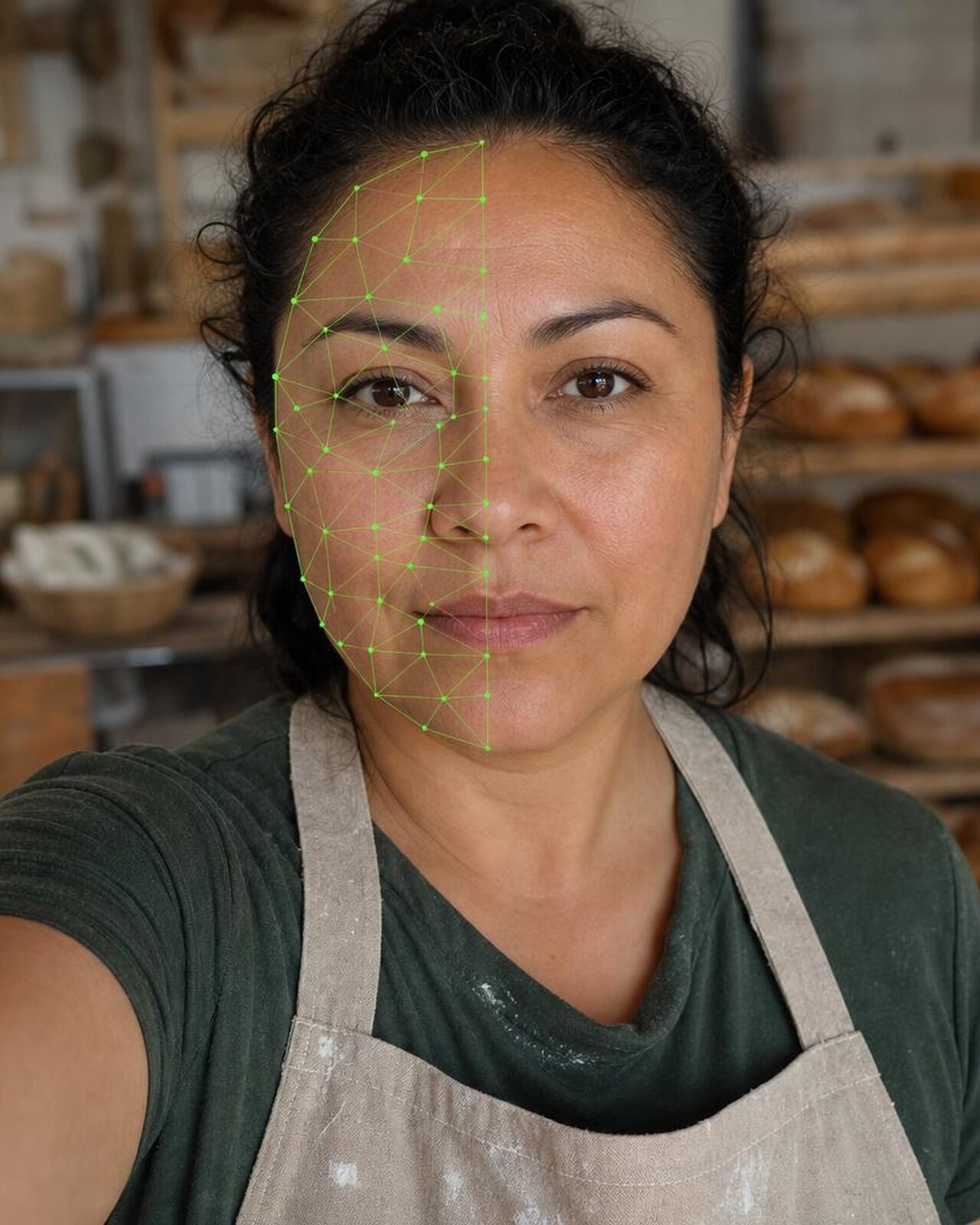
Elena Ruiz taking a Proofie selfie in her bakery while a face scan maps her face.

Fingerprint watermark

Proofie™

MRb5…h3Lw

Signed with
Passkey (P-256)
Not before
Arbitrum One #472,918,305
Place (signed)
Austin, Texas
Owner controls
Password protected · Delete any time

Verified by Merriton

Step 4: verified

Swipe for the next screen

Inside your payment approvals

Every phoned-in payment starts with verification

When a customer asks by phone to add a payee, send a wire, raise a limit or change their contact details, the three live words appear on the request in the staff view, and your staff read the same words from there when they call a customer. Your banker asks one question, confirms the match, and the request moves to your second approver with the check recorded.

Nothing replaces your identity proofing, fraud monitoring or second approver. The approver sees the request was verified before they sign off, and when your policy calls for it, your staff request a Proofie™ from the same screen. We set up the staff view in our console or inside the banking systems your team already uses.

Demo brand
Merriton Bank
Payment approvals

#5308 · $48,500 · New payee

Elena Ruiz (phone)

Caller verification
Live words
Amber Anchor Willow
New words in 42s

Ask: What are the words?

Request Proofie™
Confirm match Verified
Second approver
Grace Lin Payments Operations Awaiting approval

Caller check recorded · 9:41 AM

Sam: What are the words?

Elena: Amber Anchor Willow.

Under your own brand

Your customers verify the bank in an app that bears your name

A generic consumer app asks customers to trust one more company before they can trust you. Your customers get a verification app in your bank’s name instead, published under your own App Store and Google Play accounts. We build, submit, and maintain it.

  • Your name on the screen. The first thing customers see is your bank’s name and logo, the same brand that is on their card and their statements.
  • A check only your bank can pass. Anyone can say they’re calling from your bank. Only your staff can read the live words for a customer’s group.
  • Set up in a minute. Your bank invites each customer, and the app opens ready, with the bank group already set up.
  • A welcome letter on your letterhead. It introduces the app and the one question that now runs both ways.
Demo brand
9:41
Merriton

Welcome to Merriton ID Verify

When you call the bank, three words confirm it’s you. When we call you, ask us for the same three words.

Get started
Demo brand
9:41

Your groups

With the bank

You, Your banker, Fraud team, Branch

Family

You, Marco, Lucia, Mateo

Each group has its own three words. The bank only sees words for groups it’s in.

Invite family

Swipe for the next screen

Demo brand

Dear Elena,

When you call us, we will now ask one question: “What are the words?” You’ll find them in Merriton ID Verify, our app for your phone.

It works both ways. When anyone from Merriton calls you about your account, a card or a payment, ask us for the words before you act. If the caller can’t give them, hang up and call the number on your card. You can also set up a group with your family for calls between yourselves; we never see those words.

Our identity checks and fraud protections stay in place.

With best wishes,

Sam Okoro
Relationship Banker, Merriton Bank

Scales with the risk

Match the check to the risk your bank defines

Your verification policy sets the thresholds, and we help you write it. Your staff escalate to a Proofie™ when a threshold or trigger applies.

Set by your verification policy

Routine requests

The three words, on every call your policy treats as routine.

When all apply

  • Below your threshold
  • Known payee, account and contact details
  • No urgency or secrecy
  • The customer is reachable as usual
  • Words given promptly and correctly
  • Nothing feels off

Threshold: set by your verification policy

Three words

Set by your verification policy

Elevated requests

The three words and a Proofie™, whenever your policy’s triggers apply or anything feels off.

When any applies

  • Above your threshold
  • A new payee, a raised limit or new contact details
  • Urgency, or pressure to skip a step
  • The customer is traveling or hard to reach
  • Words slow, wrong or refused
  • Anything feels off

Threshold: set by your verification policy

Three words + Proofie™

The return

Give customers a way to know it’s really you

$12.5B reported lost to fraud by US consumers in 2024, up 25% on the year before $2.95B reported lost to imposter scams, the most commonly reported scam category

Source: Federal Trade Commission, New FTC Data Show a Big Jump in Reported Losses to Fraud to $12.5 Billion in 2024, March 2025.

  • Verified identity. Three words and a Proofie™, for calls where voice, face, caller ID and email can all be faked.
  • An answer to “Is this really my bank?” Customers no longer have to guess. If a caller can’t give the words, it isn’t you.
  • Your brand, on your customers’ side. A safety app in your bank’s name, for calls to the bank and calls home.
  • Past the text code. When the number itself is moved, a text code or callback reaches the attacker. The three words never do.
  • Frictionless for the team. The words appear on the request your staff already open, so nobody has to judge a voice.
  • Resets that wait for the words. A password or contact detail reset that waits for the words is one an impersonator can’t talk their way into.

Questions

What banks ask us first

Why should the verification app carry our bank’s name?

Because fraudsters borrow your name, and customers already trust it. An app in your bank’s name, published under your own App Store and Google Play accounts, gives customers one place to check that a call really comes from you. A generic consumer app asks them to trust another company first.

How do a customer and a banker verify each other on a call?

They share three words that rotate every 60 seconds in an app branded as your bank. When the customer calls, the banker asks “What are the words?” and checks the answer before acting. When the bank calls, the customer asks, and your staff read them from the staff view. A voice clone can copy how either one sounds, but not the three words.

Does it replace our identity proofing, MFA and fraud monitoring?

No. It adds a check before any change. Callbacks and text codes fail when an attacker has moved the customer’s phone number, and the three words still hold when that happens. Your approvals and fraud controls run as they do today.

Can customers check that a call really comes from the bank?

Yes. Whoever places the call says the words, and whoever answers checks them. If someone calling from “the bank” can’t give the words, the customer hangs up and calls the number on their card.

Does it work for every kind of customer?

Yes. Personal and business customers of any age set up the app in about a minute. The words appear on each request in the staff view, so nobody has to recognize a voice or a face.

Who can see the words, and where are the keys?

Your staff see the current words for the groups your bank is in, never the key. Each group key sits in a secure enclave on the deployment server and on each customer’s phone.

Where do our staff see the words?

In our staff console, or inside the banking systems your team already uses. We set up the connection during deployment.

Who can see a Proofie™?

The customer who takes it controls it: each Proofie™ can be password protected and deleted at any time. A Proofie™ your staff request is shared with your bank.

Next step

Settle your security team’s questions before you commit

Send this page to your security and fraud teams, then book a review with us before you decide.

Your security team can test how the three words and Proofies™ work, and where your identity proofing, fraud monitoring and approvals fit.

“Before we move any money: what are the words?”

Talk to a human: